


Social media platforms change their algorithms, search results change and ad costs rise. An email list is different: it is a direct line to people who have asked to hear from you, and you own it. That is why email remains one of the most dependable channels for keeping customers, encouraging repeat business and turning interested visitors into buyers.
This guide covers what email marketing is, the main types of email, how to build a permission-based list, how automation works, how to write and design effective emails, and how to make sure they actually reach the inbox, including the sender requirements Gmail introduced in 2024.
What is email marketing?
Email marketing is sending planned, relevant messages by email to people who have agreed to receive them, in order to inform, engage and encourage action: a purchase, a booking, a renewal, a visit or a referral. It ranges from monthly newsletters to automated sequences triggered by what someone does on your website.
Why businesses use email marketing
- You own the audience: no algorithm decides who sees your message.
- Low cost per message: sending to existing subscribers costs far less than buying new attention.
- Personal and timely: messages can be tailored to each person’s interests and actions.
- Strong for retention: most businesses earn much of their revenue from returning customers.
- Measurable: clicks, conversions and revenue can be tracked per email.
- Automatable: follow-up happens consistently, even when you are busy.
Types of email marketing
| Type | Purpose | Example |
|---|---|---|
| Promotional emails | Announce offers, launches and events | “Spring service offer: 15% off until April 30” |
| Newsletters | Regular updates, tips and news | A monthly roundup of guides and company news |
| Transactional emails | Confirm actions the customer took | Order confirmations, receipts, password resets |
| Welcome emails | Greet new subscribers and set expectations | “Thanks for joining: here’s what to expect” |
| Drip campaigns | A pre-planned series sent over time | A five-part beginner’s course |
| Automated sequences | Triggered by behavior | Abandoned cart reminders, post-purchase follow-ups |
Promotional emails
Used for sales, launches and events. They work best when they are relevant to the recipient and not sent so often that people unsubscribe. A clear offer, a deadline if there genuinely is one, and a single call to action are the essentials.
Newsletters
Newsletters keep your business in mind between purchases. The best ones are useful first and promotional second: practical tips, helpful links, behind-the-scenes stories and a few relevant offers. Consistency builds habit. See newsletters people actually read.
Transactional emails
Transactional emails are triggered by a customer’s action, such as a purchase or account change. They have very high open rates because people expect them, so make them clear, branded and helpful. They should focus on the transaction; adding heavy marketing content can change how they are treated under some laws.
Welcome emails
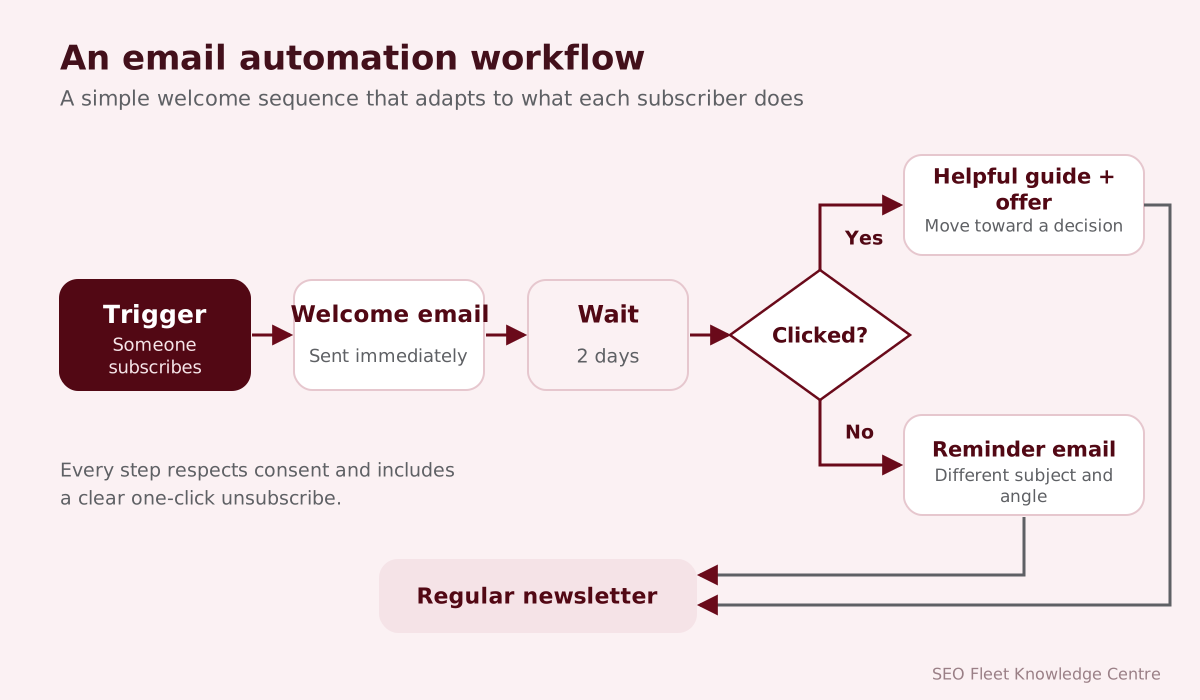
The welcome email is often the most-read message you will send. Thank the subscriber, deliver anything you promised (a guide or discount), explain what you will send and how often, and invite a first step. Many businesses use a short welcome series of three to five emails. Read how to build a welcome email sequence.
Drip campaigns
A drip campaign is a pre-written series sent at set intervals, such as one email every three days for two weeks. It suits education (an email course), onboarding new customers and nurturing leads who are not ready to buy.
Automated email sequences
Behavior-based automations respond to what people do:
- Abandoned cart: a reminder when someone leaves items in their cart.
- Browse abandonment: a follow-up after viewing a product.
- Post-purchase: thank-you, usage tips, review request, related products.
- Re-engagement (win-back): a message to subscribers who have stopped opening.
- Lead nurturing: a sequence that answers common objections for B2B leads.
Email list building
Good lists are built, not bought. Practical ways to grow a list:
- A clear sign-up form on your website, footer, blog and checkout.
- A genuinely useful incentive: a checklist, guide, discount or early access.
- Sign-up options at events, in store and on invoices, with clear consent.
- Social media and content that invite people to subscribe.
Never buy or rent email lists. Recipients did not agree to hear from you, complaint rates rise, deliverability suffers and it may break the law in your market. See growing your email list the right way.
Permission-based marketing
Permission means people have actively agreed to receive marketing email from you. Good practice:
- Explain what people are signing up for and how often you will email.
- Do not pre-tick consent boxes.
- Consider double opt-in (a confirmation email) to keep lists accurate.
- Keep records of when and how each person subscribed.
- Make unsubscribing easy and honor it promptly.
Segmentation
Segmentation divides your list into groups so each receives more relevant messages. Common segments: customers vs. prospects, purchase history, interests, location, engagement level and stage in the buying journey. Even simple segmentation, for example sending service reminders only to customers who bought that service, improves relevance and reduces unsubscribes.
Personalization
Personalization goes beyond adding a first name. Useful personalization includes recommending products related to past purchases, sending reminders at the right time, showing content relevant to someone’s location and adjusting messages for new and long-standing customers. Use personal data respectfully and only in ways subscribers would expect.
Email copywriting
- Write to one person, in a natural voice.
- Lead with what matters to the reader, not to you.
- Keep paragraphs short and scannable.
- Use one main call to action per email.
- Make the button text describe what happens: “Book your service,” not “Click here.”
- Be honest: no false urgency or misleading claims.
Subject lines
The subject line and preview text decide whether an email is opened. Clear usually beats clever. Effective subject lines tell people what is inside, are specific, and are short enough to read on a phone. Avoid misleading subject lines, which are illegal in some markets (for example under the US CAN-SPAM Act) and damage trust. Test variations on part of your list to learn what your audience responds to.
Email design
- A simple, single-column layout that reads well on any screen.
- Your logo and brand colors, used consistently.
- Readable font sizes and enough contrast.
- Images that support the message, with alt text, and a layout that still makes sense if images are blocked.
- A balance of text and images rather than a single large image.
- Your business name, postal address and an unsubscribe link in the footer.
Mobile-friendly emails
Many emails are opened on phones. Use responsive templates, large tap-friendly buttons, short subject lines, compressed images and enough spacing between links. Always preview and send tests to real devices before sending.
Deliverability
Deliverability is whether your emails reach the inbox rather than the spam folder or nowhere at all. It depends on your sending domain’s authentication and reputation, your list quality (bounces, inactive addresses, spam complaints), your content and how recipients engage. A great email that lands in spam achieves nothing.
SPF, DKIM and DMARC
| Standard | What it does |
|---|---|
| SPF (Sender Policy Framework) | A DNS record listing which servers are allowed to send email for your domain |
| DKIM (DomainKeys Identified Mail) | Adds a digital signature proving the email was authorized by the domain and not altered |
| DMARC (Domain-based Message Authentication, Reporting and Conformance) | Tells receiving servers what to do with email that fails SPF or DKIM checks and sends reports |
Since February 2024, Gmail requires all senders to set up SPF or DKIM and keep spam rates low. Senders of more than 5,000 messages a day to Gmail accounts must set up SPF, DKIM and DMARC, align the From domain with SPF or DKIM, support one-click unsubscribe for marketing messages and keep their spam rate below 0.3% (Google recommends staying below 0.1%). Yahoo introduced similar requirements. Our SPF, DKIM and DMARC guide explains setup step by step.
Open rates and click rates
| Metric | Formula | Note |
|---|---|---|
| Open rate | Opens ÷ delivered × 100 | Less reliable since Apple Mail Privacy Protection preloads emails |
| Click rate | Clicks ÷ delivered × 100 | A better measure of engagement |
| Click-to-open rate | Clicks ÷ opens × 100 | How compelling the content was |
| Bounce rate | Bounces ÷ sent × 100 | High rates harm reputation |
| Unsubscribe rate | Unsubscribes ÷ delivered × 100 | Watch for spikes after certain emails |
| Spam complaint rate | Complaints ÷ delivered × 100 | Keep well below Gmail’s thresholds |
Conversion tracking
Opens and clicks are steps, not goals. Add UTM parameters to email links so Google Analytics can attribute visits, sign-ups and sales to each campaign, and use your email platform’s ecommerce integration where available. Then measure revenue per email, conversions per campaign and the performance of each automation.
Email marketing automation tools
Common platforms include Mailchimp, Klaviyo (popular with ecommerce), HubSpot, ActiveCampaign, Brevo, Constant Contact and Campaign Monitor. When choosing, consider ease of use, automation features, integrations with your website, store or CRM, deliverability support, segmentation, reporting and pricing as your list grows.
Privacy and anti-spam regulations
| Market | Main rules | Key points |
|---|---|---|
| USA | CAN-SPAM Act | No misleading headers or subject lines, identify ads, include a postal address, honor opt-outs promptly |
| UK | PECR and UK GDPR | Consent usually required for marketing to individuals; limited “soft opt-in” for existing customers |
| European Union | GDPR and ePrivacy rules | Lawful basis, clear consent, data rights |
| Australia | Spam Act 2003 | Consent, sender identification and a functional unsubscribe |
| Canada | CASL | Express or implied consent, identification, unsubscribe |
This is a summary, not legal advice. Check the rules for every market you email and ask a legal professional if you are unsure.
Common email marketing mistakes
- Buying lists or adding people without consent.
- No SPF, DKIM or DMARC on the sending domain.
- Sending everyone the same message.
- Sending too often, or so rarely that people forget who you are.
- Emails that look broken on mobile.
- Hiding the unsubscribe link.
- Never removing inactive or bouncing addresses.
- Measuring opens instead of conversions.
Building an email marketing strategy
- Set goals: repeat sales, lead nurturing, bookings or retention.
- Choose a platform that integrates with your website or store.
- Authenticate your domain with SPF, DKIM and DMARC.
- Build sign-up points with clear consent.
- Set up core automations first: welcome series, then abandoned cart or lead nurture, then post-purchase.
- Plan a regular campaign calendar, such as a monthly newsletter and seasonal promotions.
- Segment by customer status and interests.
- Track conversions with UTMs and platform integrations.
- Review monthly, clean the list and test improvements.
Small businesses can start with our email marketing guide for small businesses.
List hygiene: keeping your list healthy
A smaller list of engaged subscribers almost always outperforms a large list of people who never open. Good habits include:
- Removing addresses that hard bounce, automatically and immediately.
- Running a re-engagement campaign for subscribers inactive for an extended period, then suppressing those who still do not respond.
- Using confirmed opt-in where spam sign-ups or typos are a problem.
- Never buying or renting lists: they damage deliverability and often break the law.
- Making it easy to unsubscribe or reduce email frequency.
A/B testing emails properly
Testing is how you replace opinions with evidence, but only if done carefully. Test one variable at a time (subject line, offer, call to action or send time), use a large enough sample to make the difference meaningful, decide in advance which metric decides the winner, and record results so learning accumulates. Because Apple Mail Privacy Protection inflates opens, judge subject line tests on clicks or conversions where possible.
Conclusion
Email marketing works because it is personal, permission-based and owned by you. Build your list honestly, authenticate your domain, automate the essential journeys, write emails people want to receive and measure what they produce. Done this way, email becomes one of the most reliable ways to keep customers coming back.
SEO Fleet offers email marketing, email automation, email deliverability and newsletter management services.


