


When someone searches “dentist near me,” “plumber in Asheville” or “best Italian restaurant,” Google usually shows a map with a short list of businesses before any ordinary website results. For local businesses, that list is often the most valuable space on the internet. People see your rating, your hours and a button to call or get directions, and many decide right there.
Local SEO is the work of helping your business appear in those results and in local searches generally. This guide explains how local search works, how to set up and optimize a Google Business Profile, why reviews and consistent business information matter, and how to measure results. It reflects the local SEO work SEO Fleet does for businesses in the USA, the UK, Australia and India.
What is local SEO?
Local SEO (local search engine optimization) improves a business’s visibility in searches with local intent: searches that include a place (“accountant in Leeds”), “near me,” or that Google interprets as local because of what is being searched (“coffee shop”). It covers your Google Business Profile, your website’s local pages, your reputation through reviews, and your business information across the web.
Local SEO matters for any business that serves customers in person or in a defined area: shops, restaurants, clinics, law firms, trades, salons, gyms, real estate agents and service-area businesses that travel to customers.
How local search works
Google explains that local results are based mainly on three factors:
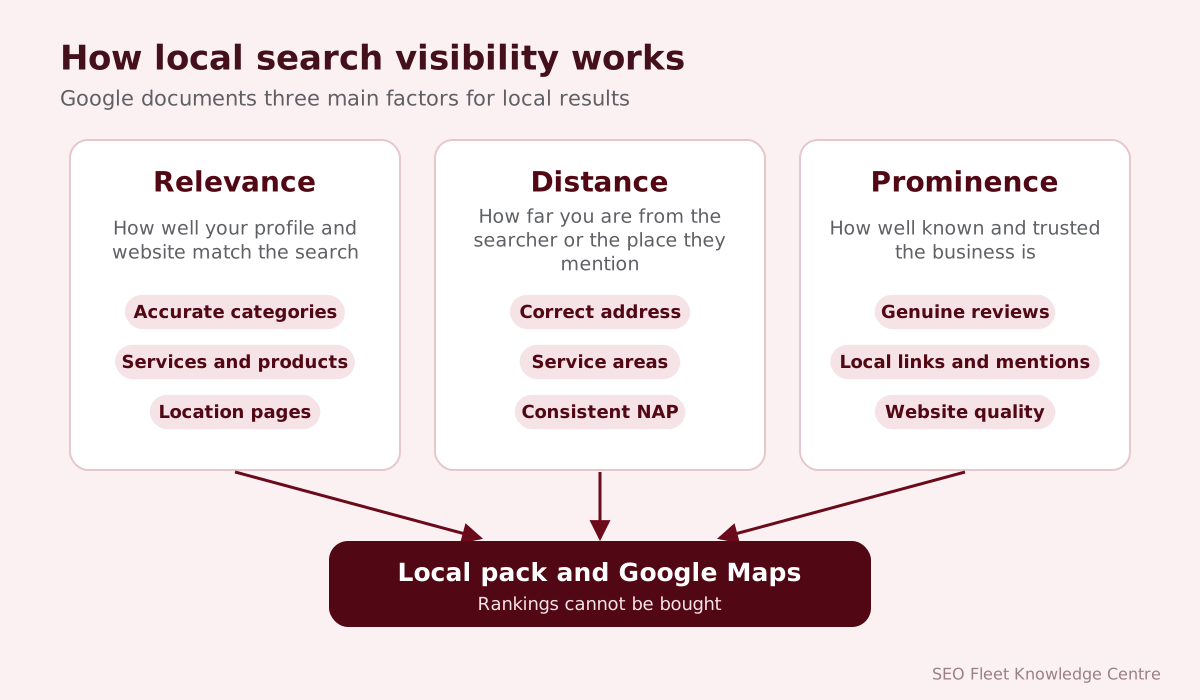
- Relevance: how well a business profile matches what someone is searching for. Complete, detailed information helps Google understand what you do.
- Distance: how far the business is from the location used in the search, or from the searcher if they have not specified a location.
- Prominence: how well-known the business is, including information Google has from across the web, such as links, articles and directories, and the number and rating of Google reviews. Google notes that organic search position is also a factor.
Google also states plainly that there is no way to request or pay for a better local ranking.
Google Maps and local search results
Local results appear in several places:
- The local pack: the map and short list of businesses within Google Search results.
- Google Maps: searches made directly in the Maps app or website.
- Business profiles in search: the panel that appears when someone searches for a specific business by name.
- Organic results: local pages on your website, such as service and location pages.
- Local search ads: paid listings marked as sponsored, separate from organic local rankings.
What is Google Business Profile?
Google Business Profile (formerly Google My Business) is the free listing that controls how your business appears in Google Search and Maps: name, address, phone, hours, categories, services, photos, reviews, posts and more. It is the single most important part of local SEO for most businesses.
Creating and optimizing a business profile
- Claim or create the profile at Google Business Profile using a business-controlled Google account.
- Verify the business using the method Google offers (video verification is common). Unverified profiles have limited visibility and control.
- Complete every relevant section: categories, hours (including holiday hours), services, products, attributes, description, website, booking link and photos.
- Add managers rather than sharing logins, and keep ownership with the business.
- Keep it active: update information, add photos, reply to reviews and publish posts.
Our Google Business Profile guide walks through each step.
Business name, address and phone consistency
Your NAP (name, address, phone number) should be identical on your website, Business Profile, social profiles and directories. Inconsistent details confuse customers and make it harder for search engines to trust your information. When you move or change numbers, update every listing.
Google’s guidelines are specific about the business name: use your real-world name as it appears on your signage, website and stationery. Adding keywords or locations to the name (for example “Smith Plumbing - Best Emergency Plumber Boston”) breaks the guidelines and can lead to suspension.
Categories and business information
Choose a primary category that describes your main business as specifically as possible (“Family law attorney” rather than “Lawyer” if that is what you are), then add secondary categories for other genuine services. Fill in attributes such as accessibility features, payment options and service options. Service-area businesses should set their areas and hide the address if customers do not visit.
Business descriptions
The description (up to 750 characters) should explain what you do, who you serve and what makes you different, in natural language. Do not include links, promotions or keyword lists. Write it for customers, not for search engines.
Services and products
Add your main services, with short descriptions and prices where appropriate, and products if you sell them. These sections help Google understand relevance and give customers more information before they call.
Photos and videos
Add real, recent photos: your exterior (so people recognize it), interior, team, products and completed work. Avoid stock photography. Keep adding new photos over time. Short videos can show your space or a service in action.
Customer reviews
Reviews influence both customers and local visibility. The number of reviews, the rating and how recent they are all shape how a business is perceived. Encourage genuine reviews by asking happy customers at the right moment, for example after a job is completed, with a direct link. Make it easy, but never offer incentives for reviews, never write fake ones and never post reviews from staff. These practices break Google’s policies, and fake reviews are illegal in many markets.
Review management
- Reply to every review, positive and negative, in a professional tone.
- Thank people specifically, not with copied replies.
- For negative reviews, acknowledge the issue, avoid arguments and offer to resolve it offline.
- Report reviews that clearly break Google’s policies, such as spam or conflicts of interest. Only Google can remove them.
- Use feedback to improve the business. Reviews are free customer research.
SEO Fleet’s Google reviews management service can help set up a steady review process.
Local citations
A citation is any online mention of your business’s name, address and phone number, usually in a directory. Citations help confirm your business information and can contribute to prominence. Focus on accuracy and relevance: the main data platforms and directories in your country, plus industry-specific sites.
Local business directories
| Country | Examples of directories worth checking |
|---|---|
| USA | Apple Business Connect, Bing Places, Yelp, Better Business Bureau, industry associations, chamber of commerce |
| UK | Apple Business Connect, Bing Places, Yell, Thomson Local, FreeIndex, trade bodies |
| Australia | Apple Business Connect, Bing Places, Yellow Pages, True Local, Hotfrog, industry bodies |
| India | Apple Business Connect, Bing Places, Justdial, IndiaMART (B2B), Sulekha, industry directories |
Hundreds of low-quality directory listings add little. A smaller number of accurate, relevant listings is what matters.
Location landing pages
If you serve several towns or have several branches, create a page for each one, but only if you can make each page genuinely useful: specific services, local team, address and directions, local projects or case studies, reviews from that area and local FAQs. Pages that are identical except for the town name are thin content and may be treated as doorway pages, which Google’s spam policies prohibit.
Local keyword research
Local searches follow patterns: “[service] in [city],” “[service] near me,” “emergency [service],” “[service] open now,” and neighborhood or suburb names. Research the variations people use in your area, including local terms (“attorney” vs. “solicitor,” “zip code” vs. “postcode”), and map them to your service and location pages.
Local content strategy
- Guides to local regulations or permits related to your service.
- Projects completed in specific neighborhoods.
- Local events you take part in or sponsor.
- Seasonal advice relevant to your area’s climate.
- Answers to questions local customers ask.
Local backlinks
Links from respected local websites support prominence: local news, chambers of commerce, business associations, community organizations, schools, charities you genuinely support, local suppliers and partners. These links tend to be both relevant and trustworthy. See how to build quality backlinks, including its section on local link building.
Multi-location SEO
Businesses with several locations need one verified profile per eligible location, consistent naming and branding, a location page for each branch, a scalable process for hours and holiday updates, and reporting by location. Google Business Profile supports bulk management for chains and franchises.
Local schema markup
LocalBusiness structured data is code on your website that describes your business: name, address, phone, opening hours, geographic coordinates and more, using schema.org vocabulary. It helps search engines interpret your details accurately. Make sure it matches your Business Profile and visible page content.
Tracking local SEO performance
| Source | What to watch |
|---|---|
| Google Business Profile performance | Calls, website clicks, direction requests, bookings, searches and views |
| Google Search Console | Impressions and clicks for local queries and location pages |
| Google Analytics 4 | Visits and conversions from the profile (use UTM-tagged website links) |
| Rank tracking tools | Map pack positions measured from several points around your area |
| Reviews | Volume, rating and response rate over time |
Remember that local rankings vary by the searcher’s exact location, so a single “ranking” number can mislead. Measure calls and inquiries above all.
Common local SEO mistakes
- Adding keywords or locations to the business name.
- Using a virtual office or PO box as the address.
- Duplicate profiles for the same location.
- Inconsistent name, address and phone details.
- Choosing too broad a primary category.
- Ignoring reviews, or buying fake ones.
- Location pages that only swap the town name.
- Forgetting holiday hours.
Local SEO for different industries
| Industry | Priorities |
|---|---|
| Restaurants and cafés | Photos, menus, hours, reservations, recent reviews |
| Healthcare and dental | Accurate practitioner and service information, booking links, reviews handled with patient privacy in mind |
| Legal and accounting | Specific categories, practice area pages, credentials, trust signals |
| Home services and trades | Service areas, emergency availability, project photos, fast response to calls |
| Retail | Products, in-store availability, opening hours, events |
| Multi-location brands | Consistency, scalable updates, location pages, roll-up reporting |
Service-area businesses vs. storefront businesses
| Factor | Storefront business | Service-area business |
|---|---|---|
| Examples | Restaurants, shops, clinics, salons | Plumbers, electricians, cleaners, mobile services |
| Address on Google Business Profile | Shown publicly | Can be hidden, with service areas listed instead |
| Main local signals | Location, reviews, photos, opening hours | Service areas, reviews, service pages, local relevance |
| Website focus | Directions, menus or products, booking | Services, areas covered, fast contact options |
Google’s guidelines say service-area businesses that do not serve customers at their address should not show it, and that virtual offices or mailboxes are not eligible addresses.
Spam and fake listings in local search
Local results sometimes contain fake listings, keyword-stuffed business names and fake reviews. Competing honestly is still the right approach: you can suggest edits to incorrect listings in Google Maps and report policy violations through Google’s business redressal complaint form. Never respond by breaking the rules yourself; it puts your own profile at risk of suspension.
Conclusion
Local SEO helps the people closest to you find and choose your business. Start with a complete, verified Google Business Profile, keep your details consistent everywhere, earn genuine reviews and reply to them, build useful location pages and local links, and track the calls and visits that result. It is steady work, and businesses that keep at it build an advantage that is hard for competitors to copy.
SEO Fleet provides local SEO, Google Business Profile management and reviews management. Our broader guide to SEO explains how local SEO fits into the bigger picture.


