


Most business owners use websites every day without needing to know what happens behind the screen. But when you are buying a domain, choosing hosting, comparing quotes from web designers or trying to work out why your site is slow, a basic understanding saves time, money and frustration.
This guide explains how websites work from the moment someone types an address to the moment the page appears, and what each piece (domain, DNS, hosting, server, database, CMS) does. We have built and managed websites for clients since 2007, so we will also share what tends to go wrong.
What is a website?
A website is a collection of related web pages, images, files and functions that share one address (a domain name) and are stored on a computer connected to the internet, called a server. Anyone with a browser, such as Chrome, Safari, Edge or Firefox, can request those pages and view them.
For a business, a website is also something more practical: the one place online you fully control. Social media profiles, marketplaces and directories all belong to someone else, and their rules can change. Your website is where you decide what customers see.
How does a website work?
Every website relies on the same basic relationship between a client (the visitor’s browser) and a server (the computer that stores and delivers the website). The browser asks for something; the server sends it back. The rules for that conversation are called HTTP (or its secure version, HTTPS).
What happens when someone enters a website URL?
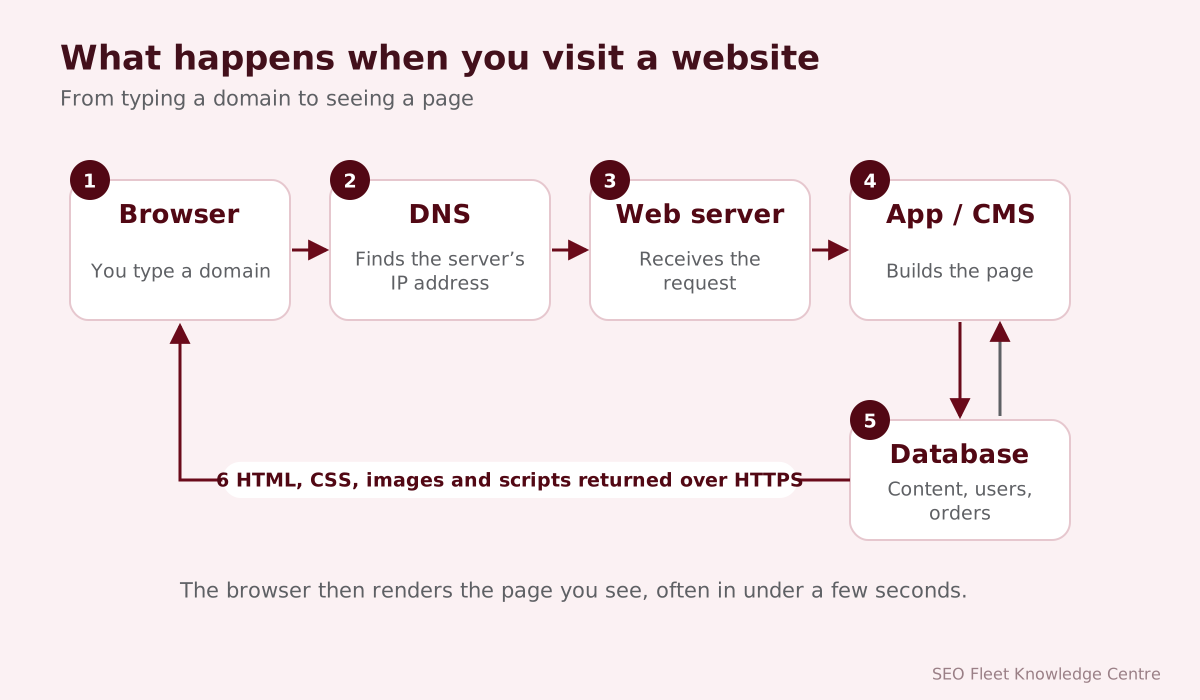
- You type a URL such as
https://www.example.com/services/or click a link. - DNS lookup: the browser asks the Domain Name System which server address (IP address) belongs to
example.com. - Connection: the browser connects to that server. With HTTPS, the two agree on encryption using the site’s SSL/TLS certificate.
- Request: the browser asks for the page at
/services/. - Server processing: for a simple site, the server sends a stored file. For a CMS like WordPress, it runs code that fetches content from a database and builds the page.
- Response: the server returns HTML (the structure and text), plus references to CSS (styling), JavaScript (interactivity) and images.
- Rendering: the browser downloads those extra files and draws the page on screen.
What is a domain name?
A domain name is the human-friendly address of a website, such as seofleet.com. Computers locate each other using numeric IP addresses; domains exist so people do not have to remember numbers.
- The part after the last dot is the top-level domain (TLD):
.com,.org, country codes like.co.uk,.com.auor.in, and newer options like.agency. - You register a domain through a registrar for a period (usually one to ten years) and must renew it. If it lapses, someone else can register it.
- A subdomain sits in front of the main domain, for example
shop.example.com.
Tip: register the domain in your business’s name, with an email address the business controls, and turn on auto-renewal. We regularly meet businesses whose domain was registered by a former employee or web designer, which can turn a simple change into weeks of paperwork.
What is web hosting?
Web hosting is renting space and resources on a server so your website is available online all the time. Common types:
| Hosting type | How it works | Suits |
|---|---|---|
| Shared hosting | Many websites share one server’s resources | Small, low-traffic sites on tight budgets |
| Managed WordPress hosting | Hosting tuned for WordPress, with updates and backups handled | Business WordPress sites |
| VPS (virtual private server) | A guaranteed slice of a server, with more control | Growing sites, custom applications |
| Dedicated server | A whole physical server for one customer | High-traffic or specialist sites |
| Cloud hosting | Resources spread across many machines, scaled on demand | Sites with changing or heavy traffic |
Cheap hosting often means slow pages and limited support. For a business website, reliability, speed, backups and security matter more than the lowest monthly price.
What is a web server?
A web server is both the computer that stores a website and the software on it (common examples are Apache, Nginx and LiteSpeed) that listens for browser requests and returns pages. Servers also run the programming languages, such as PHP, that power dynamic websites.
What is DNS?
The Domain Name System (DNS) works like the internet’s phone book. It translates domain names into IP addresses. DNS settings are managed through records:
- A / AAAA records point a domain to a server’s IPv4 or IPv6 address.
- CNAME records point one name to another, for example
wwwto the main domain. - MX records tell the internet where to deliver email for the domain.
- TXT records hold verification codes and email security settings such as SPF, DKIM and DMARC.
Changing DNS is how you move a website or email to a new provider. Because records are cached, changes can take time to reach everyone, so plan moves carefully.
What is an SSL certificate?
An SSL certificate (technically TLS, the modern version) proves a website’s identity and allows the browser and server to encrypt everything sent between them, including passwords, form entries and payment details. Browsers show a padlock or similar indicator for secure sites and warn visitors about sites that are not secure. Free certificates are widely available (for example from Let’s Encrypt), so there is no reason for any business website to run without one.
HTTP vs. HTTPS
| HTTP | HTTPS | |
|---|---|---|
| Encryption | None: data can be read or altered in transit | Encrypted with TLS |
| Browser display | Marked “Not secure” | Padlock or secure indicator |
| Trust and forms | Visitors hesitate to enter details | Expected for any form or payment |
| SEO | Disadvantage | Expected by search engines |
What is a content management system (CMS)?
A CMS is software that lets people add and edit website content without writing code. You log in to an admin area, edit text in a visual editor and publish. The CMS stores content in a database and assembles pages using templates.
Popular options include WordPress, Shopify (for stores), Wix and Squarespace (hosted website builders), Webflow, Drupal, Joomla, and custom CMSs built for a specific business.
WordPress vs. custom-built websites
| WordPress | Custom-built | |
|---|---|---|
| Start-up cost | Usually lower | Usually higher |
| Speed to launch | Fast, using themes and plugins | Slower, built to requirements |
| Flexibility | Very flexible through plugins | Anything you can specify |
| Maintenance | Regular core, theme and plugin updates needed | Depends on the code and developer |
| Security | Good when updated; popular target if neglected | Smaller target; quality depends on the developer |
| Best for | Most business websites and blogs | Unusual workflows, high performance needs, web applications |
We compare the options in more detail in WordPress or a custom website?
Different types of websites
- Business websites explain who you are, what you offer and how to contact you. Their main job is generating inquiries.
- Ecommerce websites sell products online with a catalog, cart, checkout and payments.
- Blogs publish regular articles, either as a standalone site or as part of a business site.
- Portfolio websites showcase work, common for designers, photographers, architects and agencies.
- Membership websites restrict content or features to registered or paying members.
- Web applications let users do things: book appointments, manage accounts, run calculations. They behave more like software than brochures.
- Landing pages are single, focused pages built for one campaign or offer, often used with paid advertising.
Frontend vs. backend
- The frontend is everything visitors see and interact with in the browser: layout, text, images, buttons, menus and forms. It is built with HTML, CSS and JavaScript.
- The backend runs on the server: the code that processes forms, manages logins, talks to the database and sends emails. Common languages include PHP, Python, JavaScript (Node.js), Ruby and Java.
We explain both in website design vs. website development.
Website databases
A database stores structured information the website needs: pages and posts, products and prices, customer accounts, orders and form submissions. Common systems include MySQL, MariaDB, PostgreSQL and SQLite. When a visitor opens a product page, the server asks the database for that product’s details and builds the page around them. Databases need backups, security and occasional optimization, like any other important business record.
Responsive websites
A responsive website adapts its layout to the screen it is viewed on: phone, tablet, laptop or large monitor. Menus collapse, columns stack and images resize. Google uses the mobile version of a site for indexing, and many visitors use phones first, so a site that is awkward on mobile loses both rankings and customers.
Website security
- Use HTTPS on every page.
- Keep the CMS, themes, plugins and server software updated.
- Use strong, unique passwords and two-factor authentication for admin accounts.
- Give each person only the access they need.
- Keep automatic, off-site backups and test that they restore.
- Use a web application firewall and malware monitoring for important sites.
Our article on website security basics for small businesses has a checklist.
Website performance
Page speed affects whether visitors stay and whether they become customers. Google measures real-world experience with Core Web Vitals: Largest Contentful Paint (loading, good at 2.5 seconds or less), Interaction to Next Paint (responsiveness, good at 200 milliseconds or less) and Cumulative Layout Shift (visual stability, good at 0.1 or less). The usual causes of slow sites are oversized images, too many plugins and scripts, slow hosting and no caching. See our website speed guide.
How much does a business website cost?
Costs vary widely, so it is more useful to know what drives them than to quote a single figure:
- One-off build costs: design, development, content writing, photography, number of pages and features, integrations, ecommerce functions.
- Recurring costs: domain renewal, hosting, SSL (often free), premium plugin or theme licenses, email services.
- Ongoing work: maintenance, security, updates, content changes, SEO.
A template-based site with a few pages costs far less than a custom ecommerce store or web application. When comparing quotes, check who owns the domain and code, what happens after launch and whether maintenance is included. You can see SEO Fleet’s approach on our pricing page.
What makes a good business website?
- Clarity: visitors understand within seconds what you do, for whom and where.
- Easy contact: phone number, form and location are easy to find on every page.
- Trust: real photos, reviews, credentials, case studies and clear policies.
- Speed and mobile usability: fast pages that work well on phones.
- Search visibility: a clear structure and helpful content that search engines can crawl.
- Accessibility: usable by people with disabilities, following the W3C’s WCAG guidelines.
- Easy to update: your team can change content without calling a developer for every edit.
- Measurement: analytics and conversion tracking show what the site achieves.
How to choose the right website platform
- List what the site must do: inform, generate leads, take bookings, sell products, manage members.
- Decide who will update it and how comfortable they are with technology.
- Consider growth: more pages, more products, more languages, integrations with your CRM or accounting software.
- Compare total cost over three years, not just the launch price.
- Check ownership and portability: can you move the site to another host or developer if you need to?
As a rule of thumb: WordPress suits most content-led business sites, Shopify suits most online stores, website builders suit very small sites with simple needs, and custom development suits unusual workflows or web applications.
A quick website ownership checklist
Many business owners discover during a crisis that they do not actually control their own website. Before anything goes wrong, confirm the following:
- The domain is registered in the business’s name, with an email address the business controls, and auto-renewal is on.
- You have your own login to the hosting account, the CMS administrator area and the DNS settings.
- You know where backups are stored and have tested restoring one.
- Google Analytics, Google Search Console and Google Business Profile are owned by a business account, with agencies added as users rather than owners.
- You have a copy of any contract that states who owns the design, code and content.
Conclusion
A website is a set of connected pieces: a domain that points through DNS to a server, which stores your files and database and delivers pages securely to visitors’ browsers. Understanding those pieces helps you ask better questions, avoid lock-in and keep your site fast, secure and effective.
SEO Fleet offers website design, web development, WordPress development and hosting management for businesses that want a site that works as hard as they do.


