


A website is not finished when it launches. Software receives security updates, plugins change, certificates expire, forms stop sending, links break, content goes out of date and new threats appear every week. A site that is not maintained slowly becomes slower, less secure and less effective, often without anyone noticing until something goes wrong.
Website management has been part of SEO Fleet’s work since 2007, and many of our longest client relationships started with a site that had been neglected after launch. This guide explains what maintenance involves, why it matters, how often each task should happen and how to choose who does it.
What is website maintenance?
Website maintenance is the regular work of keeping a website secure, up to date, fast, functional and accurate after it goes live. It covers software updates, backups, security monitoring, performance, testing, content updates, hosting and domain renewals, and fixing problems before visitors notice them.
Why website maintenance matters
- Security: outdated software is one of the most common ways websites are compromised.
- Reliability: broken forms or checkout errors cost leads and sales silently.
- Performance: sites slow down as content, plugins and scripts accumulate.
- Search visibility: errors, broken links, slow pages and security warnings hurt SEO.
- Trust: outdated information and old copyright dates make a business look inactive.
- Cost: regular maintenance is far cheaper than recovering from a hack, data loss or failed update.
Regular website updates
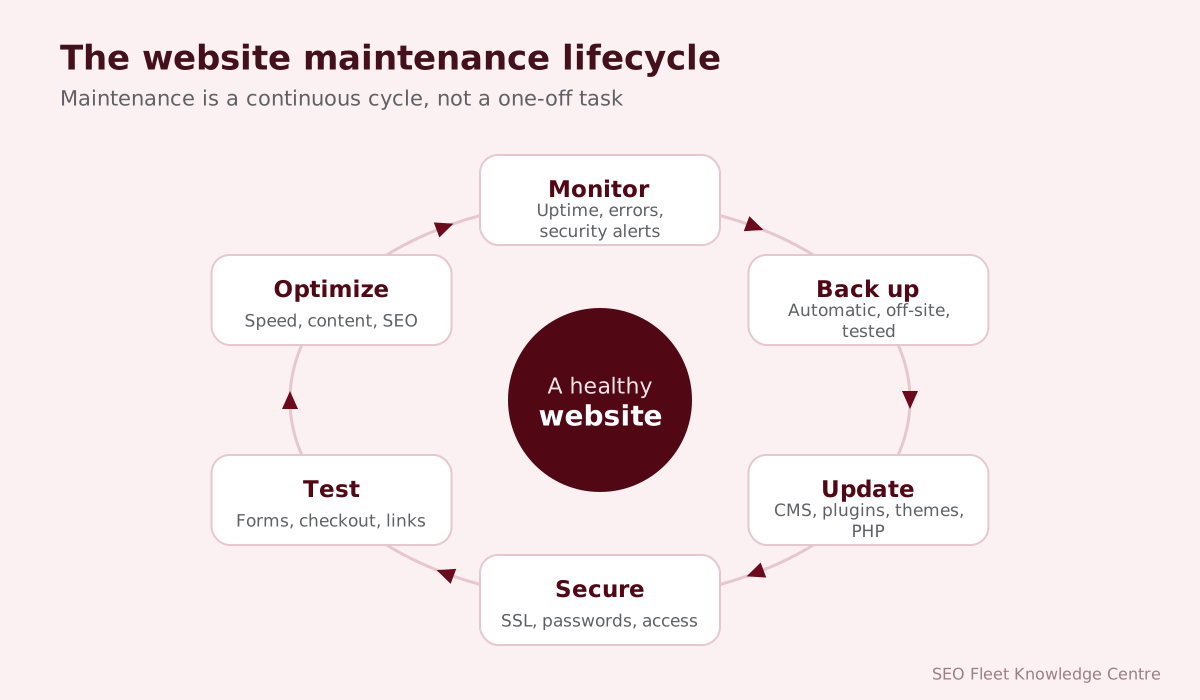
Updates fix security vulnerabilities, resolve bugs, add features and keep compatibility with browsers and servers. They apply to the content management system, themes, plugins or extensions, server software and programming languages (for example, PHP versions reach end of life and stop receiving security fixes).
CMS maintenance
Whatever platform you use (WordPress, Drupal, Joomla, Shopify, or a custom CMS), maintenance includes applying updates, reviewing user accounts and permissions, removing unused features, checking error logs and making sure editors can still publish content without problems. Hosted platforms such as Shopify handle core updates themselves, but apps, themes, content and integrations still need attention.
WordPress maintenance
WordPress powers a large share of business websites, so it deserves specific attention:
- Update WordPress core, themes and plugins regularly, after a backup.
- Remove plugins and themes you do not use.
- Replace abandoned plugins that no longer receive updates.
- Use strong passwords, two-factor authentication and limited administrator accounts.
- Keep the PHP version supported by your host and compatible with your plugins.
- Test important functions after updates: forms, checkout, bookings, logins.
Our monthly website maintenance checklist covers the routine.
Plugin and theme updates
Plugins add features but also add risk: each one is code from a different author. Before updating, back up. After updating, test. For important sites, apply updates first on a staging site (a private copy) and only then on the live site. Keep a log of what was updated and when, so problems can be traced.
Website backups
- Back up files and the database. One without the other is not a full backup.
- Automate it: daily for sites that change often, weekly at minimum for simple sites, and before every update.
- Store backups off-site, separate from your hosting account.
- Keep several versions, so you can go back to before a problem started.
- Test restores. A backup you cannot restore is not a backup.
Website security
Common threats include automated attacks on login pages, exploitation of outdated plugins, malware injection, spam form submissions and stolen passwords. Security maintenance includes updates, strong authentication, a web application firewall, file integrity checks, least-privilege access, secure hosting and HTTPS. The OWASP Top 10 describes the most common web application risks. See also website security basics for small businesses.
Malware monitoring
Malware can redirect visitors, inject spam links, steal data or send spam from your server, sometimes without visible signs. Regular scans, file change monitoring and checking Google Search Console’s Security Issues report help catch problems early. If Google detects harmful content, browsers may show warnings and search visibility can suffer until it is cleaned and reviewed.
SSL certificate management
SSL/TLS certificates expire. Most hosts and services such as Let’s Encrypt renew them automatically, but renewals can fail after DNS or hosting changes. When a certificate expires, browsers show a full-page security warning that stops most visitors. Monitor expiry dates and check that every page loads over HTTPS without mixed-content warnings.
Broken link monitoring
Links break when pages are moved, deleted or renamed, and external sites change. Broken links frustrate visitors and waste search engines’ crawl activity. Run regular crawls, fix internal links, add 301 redirects for moved pages and update or remove broken external links. Search Console reports pages Google cannot find.
Website performance
Track page speed with PageSpeed Insights and the Core Web Vitals report in Search Console. Google’s “good” thresholds are LCP at 2.5 seconds or less, INP at 200 milliseconds or less and CLS at 0.1 or less. Typical maintenance tasks: compress and resize images, remove unused scripts and plugins, enable caching, use a content delivery network, and review third-party tags. See our website speed guide.
Database maintenance
Databases accumulate clutter: old revisions, spam comments, expired temporary data and orphaned records. Periodic cleanup and optimization keep queries fast. Always back up before changing the database.
Form and functionality testing
Forms are one of the most common silent failures. A plugin update, email setting change or spam filter can stop inquiries arriving without any error on the website. Test every important form, checkout, booking system, login and search function regularly, and after every significant update. Check that notification emails arrive and are not going to spam.
Website content updates
Outdated content costs trust: old prices, staff who have left, past events, expired offers, discontinued services. Schedule reviews of key pages, update facts and screenshots, add new projects and testimonials, and refresh important articles. Search engines and visitors both value accurate, current information.
Hosting and domain renewals
Expired domains and unpaid hosting take websites and email offline instantly, and an expired domain can be registered by someone else. Use auto-renewal, keep payment details current, register domains in the business’s name with a business email address, and keep a record of every account and renewal date.
Website uptime monitoring
Uptime monitoring checks your site every few minutes and alerts you when it goes down, so problems are fixed before customers complain. Many services offer this, from free basic checks to detailed monitoring of response times and specific pages.
Website migration
Changing hosting, platforms or domains is a high-risk moment for a website. A migration plan should include a full backup, a staging test, a URL map with 301 redirects, DNS and email planning, post-launch checks and Search Console monitoring. Our website migration SEO checklist covers each step, and our website migration service handles it for you.
Maintenance schedules
| Frequency | Tasks |
|---|---|
| Continuous | Uptime monitoring, security monitoring, automated backups |
| Weekly | Review updates, check backups completed, scan for malware, check form submissions |
| Monthly | Apply and test updates, test forms and key functions, check speed and Core Web Vitals, review Search Console errors, fix broken links |
| Quarterly | Test a backup restore, review user accounts, remove unused plugins, review content accuracy, check accessibility basics |
| Annually | Review hosting, domains and certificates, review the site’s structure and goals, plan improvements or redesign |
Website maintenance checklist
- ☐ Backups running automatically, stored off-site, restore tested.
- ☐ CMS, themes and plugins updated after backup and tested.
- ☐ Unused plugins, themes and accounts removed.
- ☐ Strong passwords and two-factor authentication on all admin accounts.
- ☐ Malware and security scans clean; no Search Console security issues.
- ☐ SSL certificate valid; no mixed-content warnings.
- ☐ All forms, checkout and booking functions tested; notifications received.
- ☐ No important broken links or crawl errors.
- ☐ Page speed and Core Web Vitals checked.
- ☐ Key content, prices, team and contact details accurate.
- ☐ Domain, hosting and certificate renewal dates recorded.
- ☐ Analytics and conversion tracking working.
In-house vs. outsourced maintenance
| In-house | Outsourced provider | |
|---|---|---|
| Cost | Staff time, often hidden | Predictable monthly fee |
| Expertise | Depends on the person | Specialists in updates, security and performance |
| Consistency | Often slips when staff are busy | Scheduled and reported |
| Response to problems | Depends on availability | Defined response times |
| Best for | Organizations with technical staff | Most small and medium businesses |
How to choose a website maintenance provider
- Ask exactly what is included each month, and get it in writing.
- Check how backups are made, stored and tested.
- Ask how updates are tested and what happens if something breaks.
- Agree response times for urgent problems such as downtime or hacks.
- Ask for a monthly report showing the work done.
- Confirm that you keep ownership of the domain, hosting and site files.
- Check whether content updates and small changes are included.
What happens when maintenance is neglected
The costs of skipped maintenance rarely appear all at once. They build quietly and then arrive together:
| Neglected task | What can go wrong |
|---|---|
| Software updates | Known vulnerabilities are exploited; site is hacked or blacklisted |
| Backups | A failure or attack means rebuilding from scratch |
| SSL and domain renewals | Browser security warnings or the whole site disappearing |
| Form testing | Enquiries silently stop arriving for weeks |
| Performance | Slower pages, higher bounce rates, weaker Core Web Vitals |
| Content | Wrong prices, old staff, expired offers that undermine trust |
| Hosting and PHP versions | Unsupported software, sudden breakage when the host forces an upgrade |
Recovering from a hacked website
- Stay calm and take the site offline or into maintenance mode if it is harming visitors.
- Contact your host; many can help identify the problem.
- Change all passwords: hosting, CMS, database, FTP or SFTP and email.
- Restore a clean backup from before the compromise, or clean the infected files.
- Update everything and remove unused plugins, themes and accounts.
- Check Google Search Console for security issues and request a review once clean.
- Find the cause so it does not happen again.
Documenting your website
Keep a short, secure record of where everything lives: registrar, host, DNS provider, CMS version, key plugins, integrations, who has access, where backups go and renewal dates. When a staff member or provider changes, this document saves days of detective work and prevents lockouts.
Conclusion
Website maintenance protects the investment you made in your website. Regular updates, tested backups, security monitoring, performance checks and accurate content keep your site working for your business instead of against it. Whether you do it yourself or work with a provider, the key is consistency: a little care every month prevents costly problems later.
SEO Fleet’s webmaster services cover website maintenance, website security, speed optimization and hosting management, with a monthly report so you always know what was done.


