


When a business plans a new website, the words “design” and “development” are often used as if they meant the same thing. They do not. Design decides what the website should look like and how it should feel to use. Development turns that design into working code, connects it to databases and systems, and makes sure it runs reliably.
Understanding the difference helps you brief a web company properly, read quotes accurately and avoid a common problem: a site that looks beautiful in a presentation but is slow, hard to update or confusing to use. This guide explains each discipline, how they work together and how to choose the right team.
What is website design?
Website design is planning the structure, appearance and experience of a website. A web designer decides what goes on each page, how pages connect, how information is prioritized and how the brand is expressed through layout, color, typography and imagery.
Good design is not decoration. It answers practical questions: What does a visitor need to know first? How do they get to the service they want in two clicks? Where do they find the phone number? What makes them trust this business over another?
Design usually produces sitemaps (a plan of pages), wireframes (simple layouts without styling), mockups (realistic visual designs) and sometimes clickable prototypes, typically created in tools such as Figma.
What is UI design?
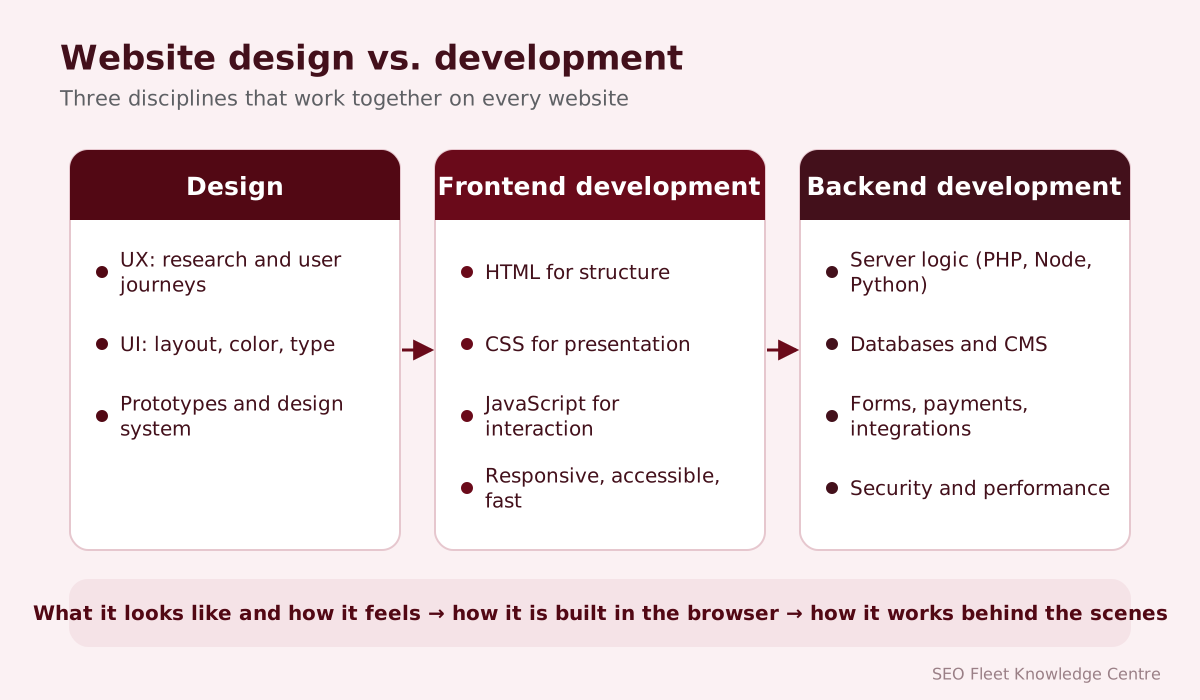
User interface (UI) design focuses on the visible, interactive elements: buttons, menus, forms, icons, cards, typography, color and spacing. A UI designer makes sure these elements are consistent, attractive and clear, so a button always looks like a button and important actions stand out.
UI designers often create a design system: a library of reusable components and rules (for example, “primary buttons are this color, this size, with this hover state”). Design systems make sites more consistent and faster to build.
What is UX design?
User experience (UX) design focuses on how easy and satisfying the website is to use. UX designers study who the users are, what they want to accomplish and where they get stuck. Their work includes user research, information architecture (how content is organized and labeled), user journeys, usability testing and accessibility.
A simple way to remember the difference: UI is how it looks; UX is how it works for the person using it. A site can have an attractive UI and poor UX, for example a beautiful booking form that asks for information in a confusing order.
What is website development?
Website development is building the website so it actually works: writing code, setting up the content management system, connecting databases and third-party services, and making sure everything is fast, secure and reliable across browsers and devices. Development is usually split into frontend and backend work.
What is frontend development?
Frontend development builds the part of the website that runs in the visitor’s browser. Frontend developers turn mockups into HTML, CSS and JavaScript, make layouts responsive, build interactive elements such as menus and sliders, and ensure the site is fast and accessible.
Many modern frontends also use frameworks or libraries such as React, Vue or Svelte, especially for interactive web applications. For many business websites, well-written HTML, CSS and a little JavaScript is faster and easier to maintain.
What is backend development?
Backend development covers everything that runs on the server: processing form submissions, user accounts and logins, payments, sending emails, generating pages from a CMS, and connecting with other systems such as CRMs, booking tools or inventory software through APIs (application programming interfaces). Common backend languages include PHP, Python, JavaScript (Node.js), Ruby, Java and C#.
What is database development?
Most websites store structured information in a database: pages, products, customers, orders, bookings. Database development involves designing how that data is organized (tables and relationships), writing efficient queries, protecting sensitive data and planning backups. A poorly designed database can make a site slow as it grows, even if the design looks great.
How design and development work together
The best projects treat design and development as one conversation rather than a handover. Developers can tell designers early if something will be slow or expensive to build; designers can explain why a detail matters to users.
| Website design | Frontend development | Backend development | |
|---|---|---|---|
| Main question | What should it look like and how should it feel? | How does it display and behave in the browser? | How does it store, process and connect data? |
| Typical tools | Figma, Adobe tools, user research | HTML, CSS, JavaScript, frameworks | PHP, Python, Node.js, databases, APIs |
| Outputs | Sitemaps, wireframes, mockups, design systems | Responsive pages and components | CMS, forms, accounts, integrations |
| Success looks like | Clear, trustworthy, easy to use | Fast, accessible, consistent on every device | Reliable, secure, scalable |
HTML, CSS and JavaScript explained
- HTML (HyperText Markup Language) provides the structure and meaning of content: headings, paragraphs, lists, links, images and forms. Using the right HTML elements helps accessibility and search engines.
- CSS (Cascading Style Sheets) controls presentation: colors, fonts, spacing, layout and how the page adapts to different screens.
- JavaScript adds behavior: opening menus, validating forms, loading new content without reloading the page, interactive maps and calculators.
Think of a house: HTML is the walls and rooms, CSS is the paint and furniture, JavaScript is the electricity that makes things move.
PHP and server-side development explained
PHP is a server-side language that powers a large share of the web, including WordPress. When someone requests a page, PHP code runs on the server, fetches content from the database, applies templates and sends the finished HTML to the browser. Server-side development also handles security tasks, such as checking form input and protecting against common attacks, which is why it must be done carefully.
WordPress vs. custom development
| WordPress (theme + plugins) | Custom development | |
|---|---|---|
| Cost to build | Usually lower | Usually higher |
| Time to launch | Faster | Longer |
| Ease of editing | Familiar editor, widely known | Depends on the admin built |
| Performance | Good with a lean theme; heavy page builders slow it down | Can be very fast |
| Maintenance | Regular updates for core, theme and plugins | Updates to frameworks and server software |
| Best for | Most business and content sites | Unique workflows, applications, high performance |
Ecommerce development
Online stores add product catalogs, variants (size, color), inventory, shopping carts, checkout, payment gateways, shipping and tax rules, order management and customer accounts. Platforms such as Shopify and WooCommerce handle much of this out of the box; larger or unusual stores may use Adobe Commerce (Magento), BigCommerce or custom builds. Security and checkout usability are critical, because problems directly cost sales.
Responsive and mobile-first design
Responsive design means one website adapts to every screen size. Mobile-first means designing for the smallest screen first, then adding enhancements for larger screens. It forces clear priorities, because a phone screen has no room for clutter. Google uses the mobile version of a site for indexing, so mobile quality affects search visibility as well as user experience.
Website speed and performance
Design and development choices both affect speed. Large uncompressed images, autoplaying videos, many web fonts, heavy page builders and third-party scripts all slow pages down. Google’s Core Web Vitals measure loading (LCP, good at 2.5 seconds or less), responsiveness (INP, good at 200 milliseconds or less) and visual stability (CLS, good at 0.1 or less). Performance is easiest to achieve when it is part of the brief from the start, not a fix after launch.
Accessibility
An accessible website can be used by people with visual, hearing, motor or cognitive disabilities, including those using screen readers or keyboards instead of a mouse. The W3C’s Web Content Accessibility Guidelines (WCAG) are the standard reference. Practical basics include sufficient color contrast, text alternatives for images, proper heading structure, visible keyboard focus, labeled form fields and captions for video. Accessibility is good practice, often a legal expectation, and usually improves usability for everyone. See our website accessibility basics.
Website security
Security belongs in both design and development: secure forms, validated input, protection against spam and common attacks, HTTPS, careful handling of personal data, role-based admin access, updates and backups. Developers should follow established guidance such as the OWASP Top 10, which lists the most common web application security risks.
The website design and development workflow
- Discovery: goals, audience, content, competitors, technical requirements and budget.
- Planning: sitemap, user journeys, features and integrations.
- Wireframes: layouts for key pages, agreed before visual design.
- Visual design: mockups and a design system.
- Content: writing, photography and video, ideally in parallel with design.
- Development: frontend build, CMS setup, backend features and integrations.
- Testing: browsers, devices, speed, accessibility, forms, tracking and security.
- Launch: redirects from old URLs, analytics, search console and monitoring.
- Maintenance and improvement: updates, backups, content changes and testing new ideas.
SEO Fleet perspective: the most expensive mistake we see in redesigns is launching without redirects from old URLs. Years of search visibility can disappear overnight. Our website redesign checklist and migration SEO checklist help avoid it.
Common mistakes
- Choosing a design from a template gallery before defining what the site must achieve.
- Leaving content until the end, then forcing it into layouts that do not fit.
- Designing only for desktop and adapting for mobile later.
- Adding plugins or scripts for every small feature, slowing the site down.
- Ignoring accessibility and forms usability.
- No analytics or conversion tracking at launch.
- No maintenance plan after launch.
- Not owning the domain, hosting account or code.
How to select a website development company
- Look at live websites they built, not just screenshots, and test them on your phone.
- Ask who will design, build and support your site, and where they are based.
- Ask how they handle SEO, speed, accessibility and security.
- Check what you will own at the end: domain, code, design files and accounts.
- Ask what happens after launch: training, maintenance, support and costs.
- Get a written scope that lists pages, features, integrations and what is excluded.
Cost considerations
The main cost drivers are the number of unique page designs, custom features and integrations, ecommerce complexity, content creation, the level of design customization and ongoing maintenance. A website built on a well-chosen theme with modest customization costs much less than a fully custom design and build. Budget for at least the first year of hosting, maintenance and improvements, not only the launch.
Who does what: roles on a website project
| Role | Main responsibility | Typical deliverables |
|---|---|---|
| Strategist or project manager | Goals, scope, budget, timeline | Brief, sitemap, schedule |
| UX designer | Structure and user journeys | User flows, wireframes, prototypes |
| UI or visual designer | Look and feel | Design system, page designs |
| Content writer | Words that inform and persuade | Page copy, headings, microcopy |
| Frontend developer | Turning designs into working pages | HTML, CSS, JavaScript, responsive layouts |
| Backend developer | Server logic, data and integrations | CMS setup, forms, APIs, databases |
| QA tester | Finding problems before launch | Test plans, bug reports |
| SEO specialist | Search visibility from day one | URL structure, metadata, redirects, technical checks |
On small projects one person may cover several roles. What matters is that each responsibility is clearly owned by someone.
Questions to ask before you sign off a design
- Has every important page been designed for both mobile and desktop?
- Do the designs include states such as form errors, empty search results and loading?
- Are colors and text sizes accessible, with enough contrast?
- Has the developer confirmed that the design can be built within budget and the chosen platform?
- Is the content real, or will placeholder text hide layout problems until launch?
Conclusion
Design and development are two halves of the same job. Design makes a website clear, attractive and easy to use; development makes it work, quickly and securely, today and as your business grows. The best results come from teams that plan both together, with your business goals at the center.
SEO Fleet provides website design, web development, ecommerce development and website redesigns, with SEO built in from the start.


